Soulframe detected a problem with your computer.
If you're seeing this error, it could be for one of the following reasons, but before starting to troubleshoot the issue, please try to reboot your computer first.
1) Your computer does not have enough free space
If your PC's hard drive gets full, it will be shown in red as below. Please make sure both your PC's system drive and the drive on which you installed Soulframe are not running low on free space.
Following this guide can help to free up Disk Space using tools within Windows.
2) Check the health of your drive
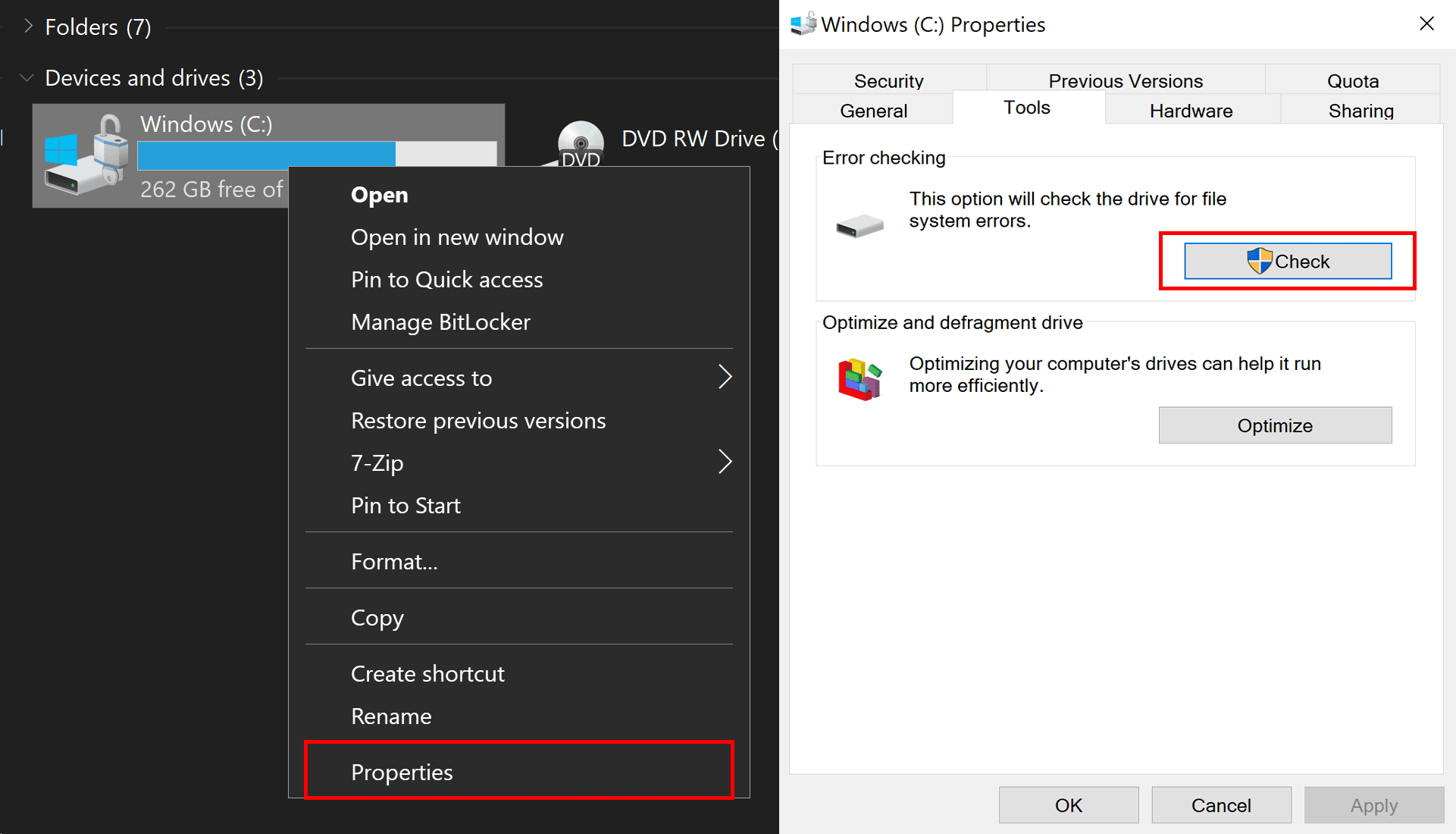
Faulty drives can cause many problems in a system, but there is a tool built into Windows that is easy to use. You can right-click on your Local Disk, followed by Properties, then click Check under Error Checking.
3) Your antivirus (security) software might be interfering
Please add an exception to all of your firewall and antivirus programs (including Windows Firewall/Defender) for "Soulframe.x64.exe", which can be found in the folder where you installed Soulframe.
4) Install the game onto the same drive as Windows
If Soulframe was installed on an external portable hard drive, it may not work as well and can often be the cause of hardware malfunction. Please try reinstalling the game onto the drive that Windows is installed on (C:).
We want Soulframe to work for you, and this page is intended to get you in the game. If nothing helps you please contact your computer manufacturer or a local technician and see if they can help.